How to color-code a family calendar so it stays readable
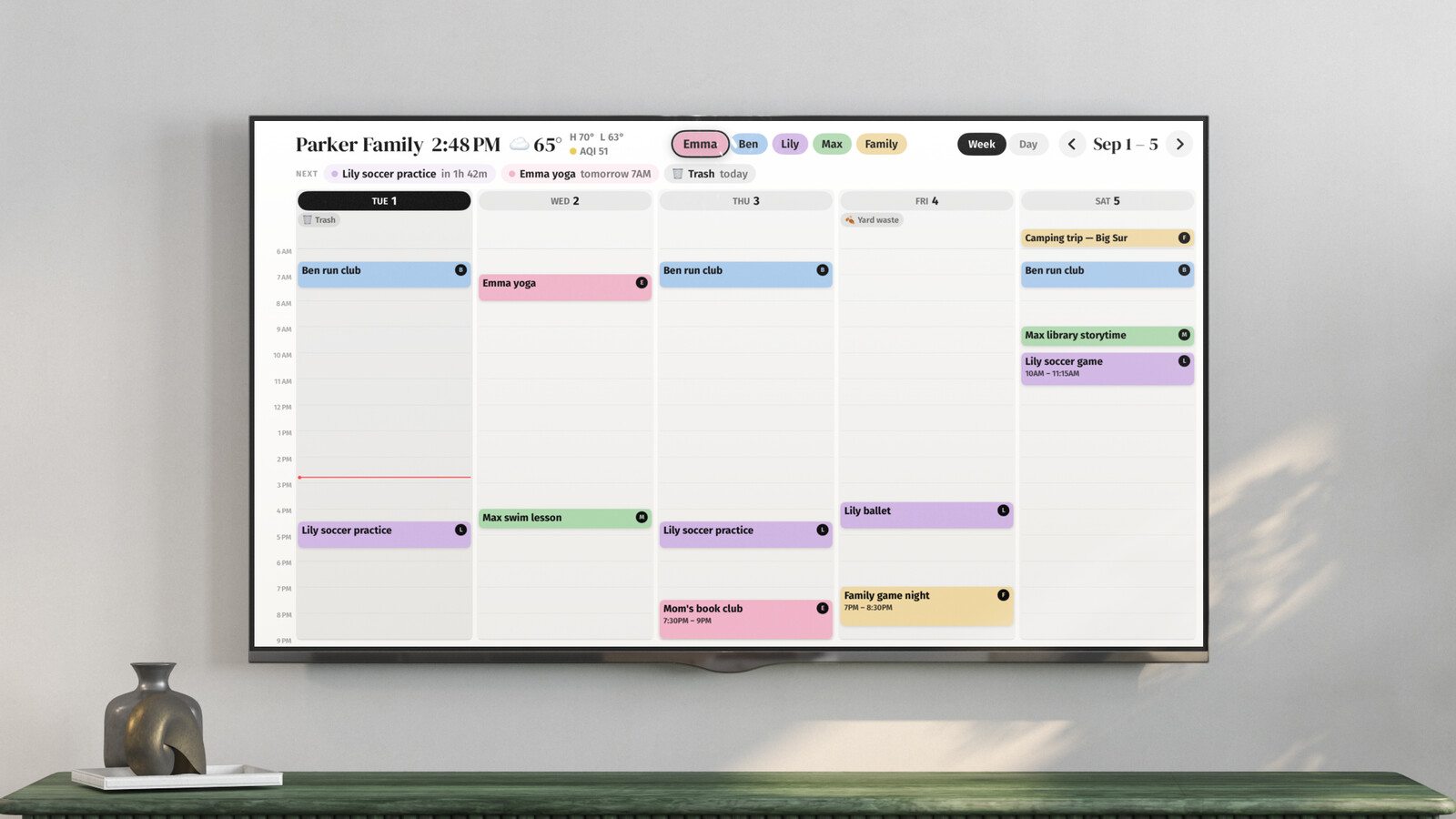
Color-coding does more for a family calendar than any other single change. Done right, a packed week reads from across the room: the blue pile-up on Thursday is Jake's, the pink 4pm is Maya's, and nobody has to read a word to know who's busy. Done wrong, it decays into a legend nobody remembers. We've watched a lot of family calendars through building Callie; these are the rules that hold up.
Rule 1: color by person, not by category
The classic mistake is coloring by type: green for sports, purple for medical, orange for school. It feels organized and answers the wrong question. Nobody stands in the kitchen wondering "what medical events exist this week?" They wonder "what does Maya have today?" Person-colors answer that at a glance; category-colors make you read every title anyway. If categories matter to you, put them in the title ("Jake: dentist") and let color carry the who.
Rule 2: let people pick, then never change
Colors only work when they're automatic, when the family has internalized that blue is Jake. That takes a few weeks, and it resets every time someone reshuffles the palette. So: everyone picks once (kids will have opinions; let them win), and the assignment is permanent. Changing your color should feel roughly as drastic as changing your name.
Rule 3: keep family-wide events neutral
Dinner at Grandma's belongs to everyone; putting it in Dad's color quietly turns it into Dad's job. Use a separate neutral color for whole-house events: gray, or a "family" color the palette doesn't confuse with a person. It also keeps any one person's column from looking busier than it is.
Rule 4: five-ish colors is the ceiling
Distinguishable-at-a-distance is the constraint: red/pink and blue/teal collapse into each other from ten feet. A family of four to six fits comfortably; past that, lean on initials or avatars next to the color rather than adding a seventh hue. This is also why coloring every calendar (work, school, team, holidays) falls apart: you run out of distinguishable colors long before you run out of calendars.
Making the tools cooperate
Google Calendar colors per-calendar, so per-person colors mean per-person calendars, which is worth doing anyway (here's the setup). Apple Calendar works the same way: each calendar gets its color, so give each person a calendar. The friction in both is that the shared event problem (Rule 3) needs its own "Family" calendar, and that everyone's phone shows the colors only if everyone subscribed to everything correctly. This is the part that quietly breaks in mixed iPhone/Android houses.
In Callie the system is the default rather than a setup project: every person gets a color when you add them, and events land on the right person automatically. Callie reads names and nicknames in event titles, so "Maya swim 4pm" shows up in Maya's color without anyone re-filing it. When it guesses wrong, you fix it once and the correction applies to the whole series, and Callie remembers the rule. One shared family calendar or one feed per person: both end up color-coded the same way on the board.
The test
Stand where the family actually looks at the calendar (the kitchen, the couch) and check tomorrow from there. If you can name who's got something on without reading a single title, the system works. If you have to walk closer, it doesn't matter how pretty the palette is; something in rules 1–4 got skipped.
Keep reading
- The best family calendars in 2026: apps, displays, and your TV
- 6 Skylight Calendar alternatives worth a look in 2026
- Is the Skylight Calendar worth it? The five-year math
Callie puts the family calendar on the Apple TV, iPad, and iPhone you already own. See how it works or start free.